1) Reference architecture
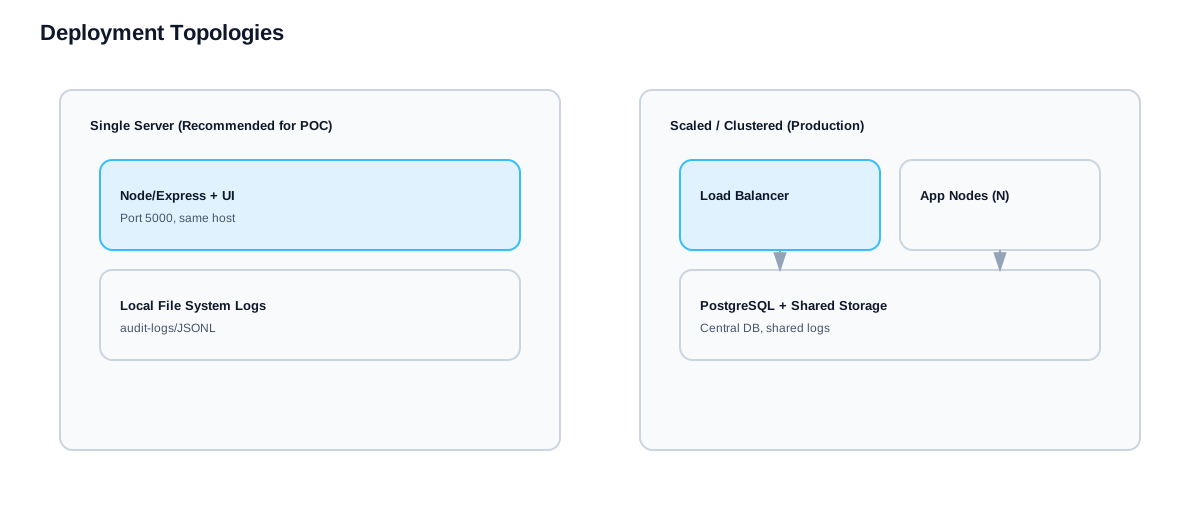
Recommended topology
- Public HTTPS load balancer / gateway
- TLS termination at the load balancer (recommended)
- Private network (VPC/VNET) for app + DB
- App listens on port 5000 (private)
- Optional managed PostgreSQL (for HA / scaling)
2) Resource Requirements
VM Sizing Guidelines
| Tier | vCPU | RAM | Root Disk | Data Disk | Agents Supported |
|---|---|---|---|---|---|
| Dev/POC | 2 | 4 GB | 20 GB | 10 GB | ≤50 |
| Small Prod | 4 | 8 GB | 30 GB | 50 GB | ≤200 |
| Medium | 8 | 16 GB | 40 GB | 100 GB | ≤1,000 |
| Large | 16 | 32 GB | 50 GB | 250 GB | ≤5,000 |
Storage Planning
| Mount Point | Purpose | Size |
|---|---|---|
| /opt/MinusNow | App + data | 50+ GB |
| /var/lib/postgresql | DB (if used) | 50+ GB |
| /var/log | Logs | 20+ GB |
Swap Configuration
# Create 8 GB swap
sudo fallocate -l 8G /swapfile
sudo chmod 600 /swapfile
sudo mkswap /swapfile
sudo swapon /swapfile
# Persist in /etc/fstab
echo "/swapfile none swap sw 0 0" | sudo tee -a /etc/fstab
3) Network Port Matrix
| Port | Protocol | Direction | Service | Description |
|---|---|---|---|---|
| 22 | TCP | Inbound | SSH | Admin (restrict to bastion/VPN) |
| 80 | TCP | Inbound | HTTP | Redirect to HTTPS |
| 443 | TCP | Inbound | HTTPS | Public web traffic (LB) |
| 5000 | TCP | Internal | Node.js | App port (LB → App only) |
| 5432 | TCP | Internal | PostgreSQL | DB (if using RDS/Cloud SQL) |
| 25/465/587 | TCP | Outbound | SMTP | Email notifications |
| 389/636 | TCP | Outbound | LDAP/S | Active Directory |
| 123 | UDP | Outbound | NTP | Time sync |
Agent communication: Agents connect outbound on TCP 443 to the MinusNow server. No inbound ports required on client servers.
4) Cloud quickstart (VM based)
Linux VM (recommended)
# 1) Base packages
sudo apt update && sudo apt upgrade -y
sudo apt install -y ca-certificates curl git nginx ufw
# 2) Node.js 20 LTS
curl -fsSL https://deb.nodesource.com/setup_20.x | sudo -E bash -
sudo apt install -y nodejs
# 3) Create app directory and user
sudo mkdir -p /opt/MinusNow
sudo useradd -r -s /sbin/nologin minusnow
sudo chown minusnow:minusnow /opt/MinusNow
# 4) Clone and build
cd /opt/MinusNow
sudo -u minusnow git clone <YOUR_REPO_URL> .
sudo -u minusnow npm install
sudo -u minusnow npm run build
# 5) Configure environment
sudo cp .env.example .env
sudo nano .env # Set APP_BASE_URL, SESSION_SECRET, SMTP_*
# 6) Create systemd service (see below)
# 7) Start
sudo systemctl enable --now MinusNow
Windows Server VM
# Install prerequisites
- Node.js 20 LTS (nodejs.org)
- Git for Windows (git-scm.com)
- NSSM (nssm.cc) for service management
# Build & configure
git clone <YOUR_REPO_URL> C:\MinusNow
cd C:\MinusNow
npm install
npm run build
# Set environment variables (System Properties)
NODE_ENV=production
PORT=5000
APP_BASE_URL=https://minusnow.yourdomain.com
SESSION_SECRET=<openssl rand -hex 32>
SMTP_HOST=smtp.yourdomain.com
SMTP_PORT=587
SMTP_USER=smtp-user
SMTP_PASS=smtp-pass
SMTP_FROM=MinusNow <no-reply@yourdomain.com>
SUPPORT_EMAIL=support@minusnow.com
# Install as service with NSSM
nssm install MinusNow "C:\Program Files\nodejs\node.exe"
nssm set MinusNow AppParameters "dist\index.cjs"
nssm set MinusNow AppDirectory "C:\MinusNow"
nssm start MinusNow
5) Systemd Service Configuration
Create service file: /etc/systemd/system/MinusNow.service
[Unit]
Description=MinusNow ITSM Platform
Documentation=https://minusnow.yourdomain.com/documentation/
After=network.target
[Service]
Type=simple
User=minusnow
Group=minusnow
WorkingDirectory=/opt/MinusNow
EnvironmentFile=/opt/MinusNow/.env
ExecStart=/usr/bin/node dist/index.cjs
Restart=always
RestartSec=10
StandardOutput=journal
StandardError=journal
# Security hardening
NoNewPrivileges=true
ProtectSystem=strict
ProtectHome=true
ReadWritePaths=/opt/MinusNow/data /opt/MinusNow/audit-logs /opt/MinusNow/support-tickets /opt/MinusNow/artifacts
# Resource limits
MemoryMax=2G
CPUQuota=80%
[Install]
WantedBy=multi-user.target
# Enable and start
sudo systemctl daemon-reload
sudo systemctl enable MinusNow
sudo systemctl start MinusNow
sudo systemctl status MinusNow
# View logs
journalctl -u MinusNow -f
6) Cloud security baseline
Security Groups / NSG Rules
| Rule | Source | Port | Action |
|---|---|---|---|
| HTTPS Inbound | 0.0.0.0/0 | 443 | Allow |
| HTTP Redirect | 0.0.0.0/0 | 80 | Allow |
| SSH Admin | Bastion/VPN CIDR | 22 | Allow |
| App Health | LB Subnet | 5000 | Allow |
| All Other | * | * | Deny |
⚠️ Enable WAF + rate limiting for public endpoints.
Linux firewall (UFW)
# Allow SSH from admin IP only
sudo ufw allow from <ADMIN_IP> to any port 22 proto tcp
# Allow LB to reach app
sudo ufw allow from <LB_SUBNET> to any port 5000 proto tcp
# Allow outbound SMTP
sudo ufw allow out 587/tcp
# Enable firewall
sudo ufw default deny incoming
sudo ufw default allow outgoing
sudo ufw enable
sudo ufw status verbose
7) Environment variables
| Variable | Required | Default | Purpose |
|---|---|---|---|
| NODE_ENV | Yes | — | Set to production |
| PORT | No | 5000 | Application listen port |
| APP_BASE_URL | Yes | — | Public URL for links and emails |
| SESSION_SECRET | Yes | — | Session signing key (32+ hex chars) |
| SMTP_HOST | Yes | — | SMTP relay hostname |
| SMTP_PORT | Yes | 587 | SMTP port (25/465/587) |
| SMTP_USER | Yes | — | SMTP username |
| SMTP_PASS | Yes | — | SMTP password |
| SMTP_FROM | Yes | — | From address for emails |
| SUPPORT_EMAIL | Rec. | support@minusnow.com | Support mailbox |
| DATABASE_URL | No | — | PostgreSQL connection string |
| AD_URL | No | — | LDAP/AD bind endpoint |
| AD_DOMAIN | No | — | AD domain for username formatting |
# Generate secure SESSION_SECRET
openssl rand -hex 32
8) Database (optional)
When to use PostgreSQL
- Multiple app instances / HA
- Centralized persistence requirement
- Cloud-native backup/restore
- >1000 agents or heavy workload
Configuration
# Connection string format
DATABASE_URL=postgres://minusnow:<password>@db-host:5432/minusnow
# Example for AWS RDS
DATABASE_URL=postgres://minusnow:MySecureP4ss@minusnow-db.abc123.us-east-1.rds.amazonaws.com:5432/minusnow
Keep DB private (no public IP). Use security groups / private endpoints / VPC peering.
9) Client Agent Deployment
Linux Agent
# Download and install
curl -fsSL https://minusnow.yourdomain.com/documentation/downloads/agent-install-linux.sh \
-o agent-install-linux.sh
chmod +x agent-install-linux.sh
sudo ./agent-install-linux.sh \
--server https://minusnow.yourdomain.com \
--org YOUR_ORG_ID \
--interval 300
# Verify
sudo systemctl status MinusNow-agent
journalctl -u MinusNow-agent -f
Windows Agent
# PowerShell (as Administrator)
Invoke-WebRequest -Uri "https://minusnow.yourdomain.com/documentation/downloads/agent-install-windows.ps1" `
-OutFile "C:\Temp\agent-install-windows.ps1"
PowerShell -ExecutionPolicy Bypass `
-File "C:\Temp\agent-install-windows.ps1" `
-Server "https://minusnow.yourdomain.com" `
-Org "YOUR_ORG_ID" `
-Interval 300
# Verify
Get-Service -Name "MinusNowAgent"
Agent Requirements
| OS | Prerequisites | Network |
|---|---|---|
| Linux | bash, curl, systemd | Outbound HTTPS (443) to MinusNow server |
| Windows | PowerShell 5.1+, .NET 4.7.2+ | Outbound HTTPS (443) to MinusNow server |
10) Operations & troubleshooting
Health checks
# Internal health
curl -I http://127.0.0.1:5000/health
# Public health (via LB)
curl -I https://minusnow.yourdomain.com/health
# API health endpoints
curl https://minusnow.yourdomain.com/api/telemetry/health
curl https://minusnow.yourdomain.com/api/telemetry/overview
Service control
# Linux (systemd)
systemctl status MinusNow
systemctl restart MinusNow
journalctl -u MinusNow -n 200 --no-pager
# Windows
Get-Service MinusNow
Restart-Service MinusNow
Get-Content C:\MinusNow\logs\app.log -Tail 100
Troubleshooting Guide
| Issue | Cause | Solution |
|---|---|---|
| 502 Bad Gateway | App not running | Check systemctl status MinusNow |
| Connection refused | Firewall blocking | Allow port 5000 from LB subnet |
| SSL certificate error | Invalid cert | Check LB certificate or use Let's Encrypt |
| Email not sending | SMTP config | Verify SMTP_* env vars and outbound port 587 |
| SSO/AD login fails | LDAP unreachable | Check AD_URL and outbound port 389/636 |
| Agent not reporting | Network blocked | Allow outbound 443 from client servers |
11) DNS & Hostname Configuration
Required DNS Records
| Type | Name | Value |
|---|---|---|
| A | minusnow.yourdomain.com | LB Public IP |
| CNAME | www.minusnow.yourdomain.com | minusnow.yourdomain.com |
Set VM Hostname
# Linux
sudo hostnamectl set-hostname minusnow-app-01
# Windows PowerShell
Rename-Computer -NewName "MinusNow-APP-01" -Restart
12) First Login & Support
Default Admin Credentials
Username: Administrator
Password: WelcometoMinusNow
⚠️ Change password immediately after first login!
Need Help?
Email: support@minusnow.com
Website: /site/contact
Documentation: /documentation/