Production guide for deploying and operating MinusNow
This documentation hub covers architecture, design model, deployment patterns, operational analytics, security controls, and troubleshooting. Use it as your single reference from pilot to stable production.
In-depth reference guides covering OS compatibility, every platform module, and agent deployment.
OS Compatibility & Prerequisites
Server and agent OS support matrix, hardware requirements, software prerequisites, database setup, firewall ports, user permissions, and satellite server requirements.
Complete agent deployment for Linux (Ubuntu, RHEL, SUSE, Amazon), Windows (GUI and silent), and macOS. Includes registration, auto-healing permissions, verification, upgrades, and troubleshooting.
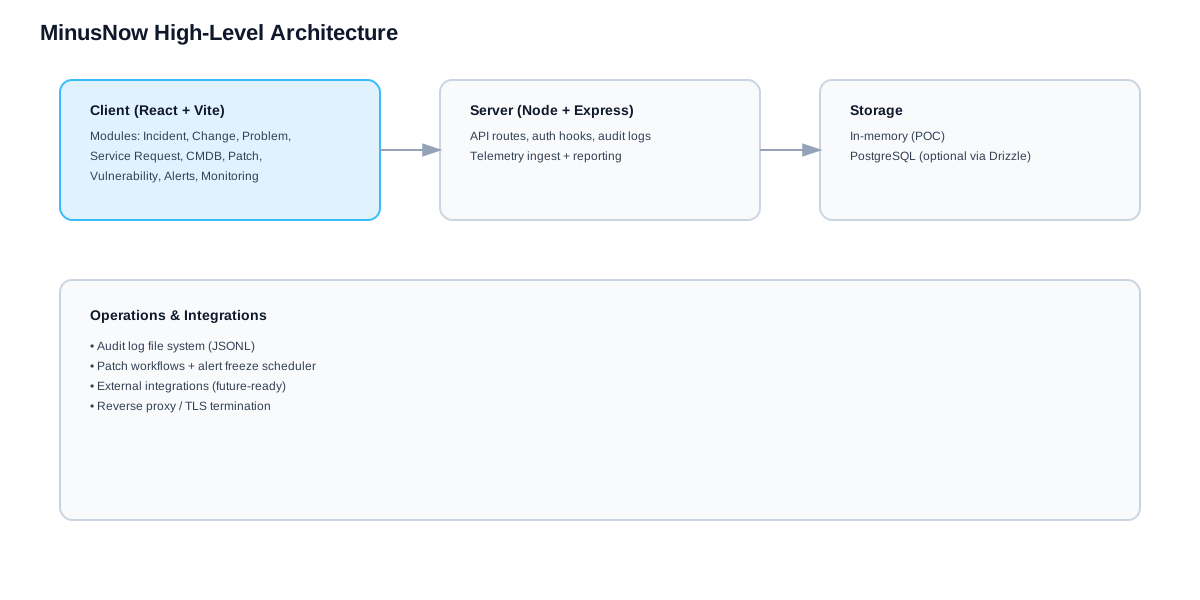
MinusNow follows layered separation across experience, API orchestration, persistence, and telemetry ingestion. Each layer can scale independently while retaining a single source of truth for incidents, CMDB, and audit records.
Experience Layer: Website, authentication, and operator console.
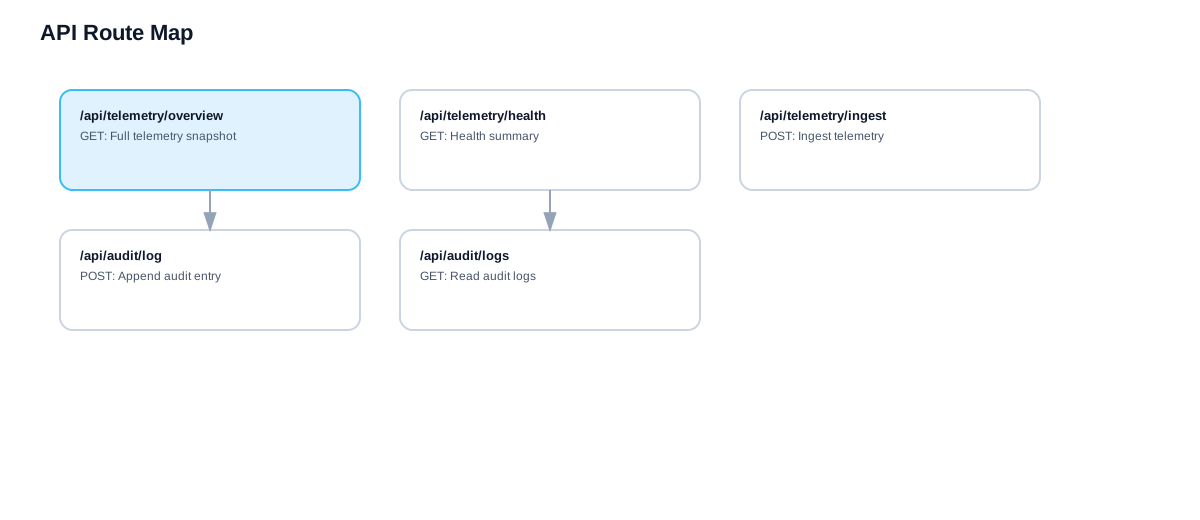
Control Layer: API endpoints, policy checks, workflow automation, and RBAC.
Data Layer: PostgreSQL for structured state and object/file store for artifacts.
Telemetry Layer: Agent ingestion, normalization, and event correlation.
Integration Layer: SMTP, identity source, and observability tooling.
Recommended production baseline: separate database and app hosts, backups enabled, and centralized logging configured before go-live.
Reference architecture with platform layers and external integrations.
Design Model and Flow
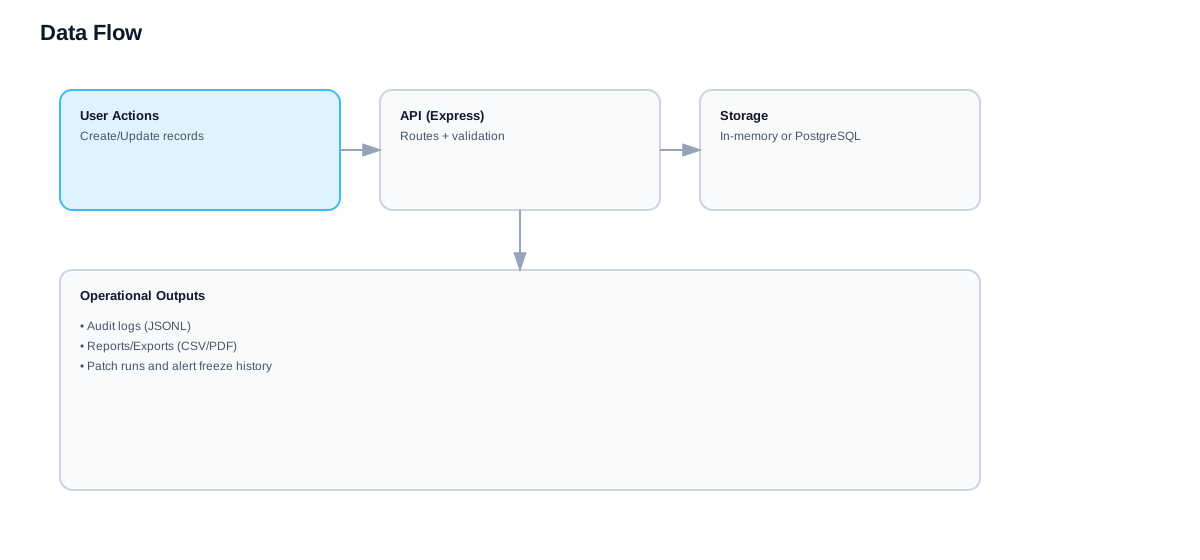
Capture, analyze, act
Capture
Events enter via API actions and endpoint agents, then are normalized and enriched with source metadata.
Analyze
Rules and scoring correlate incidents, assets, vulnerabilities, and patch obligations.
Act
Workflows trigger tickets, notifications, AI-powered ownership assignment, explainable recommendations, and remediation traces with global communications delivery.
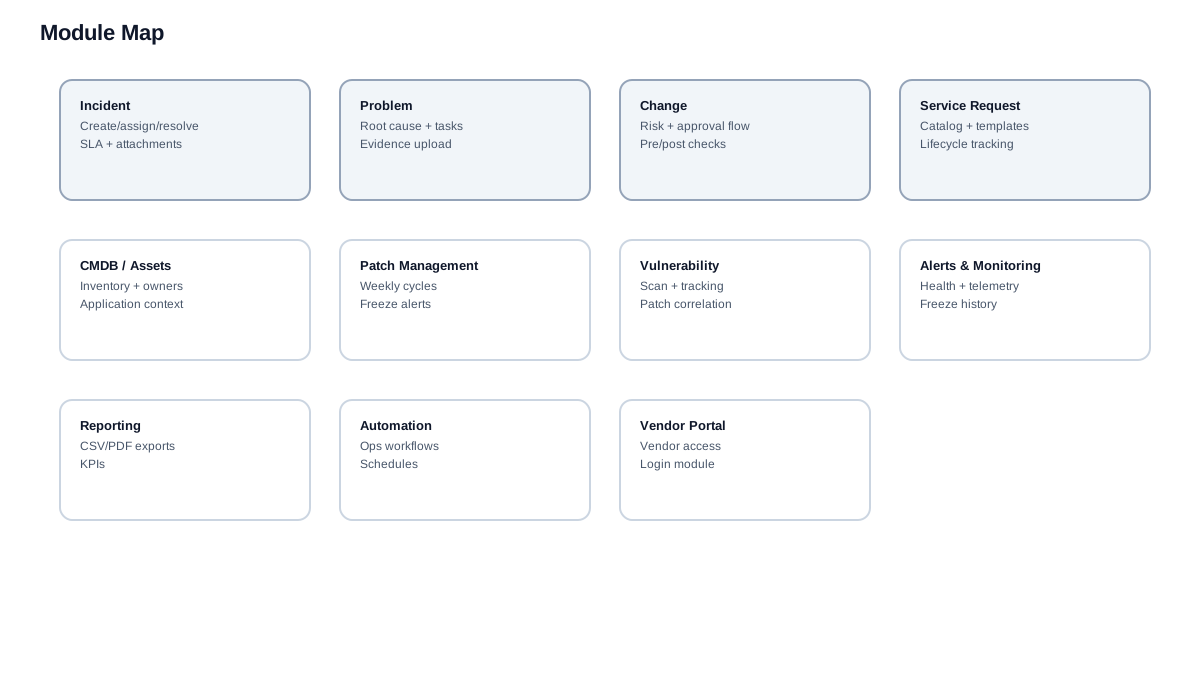
Data flow from capture to remediation.Module map for ITSM, operations, and governance.
Deployment Models
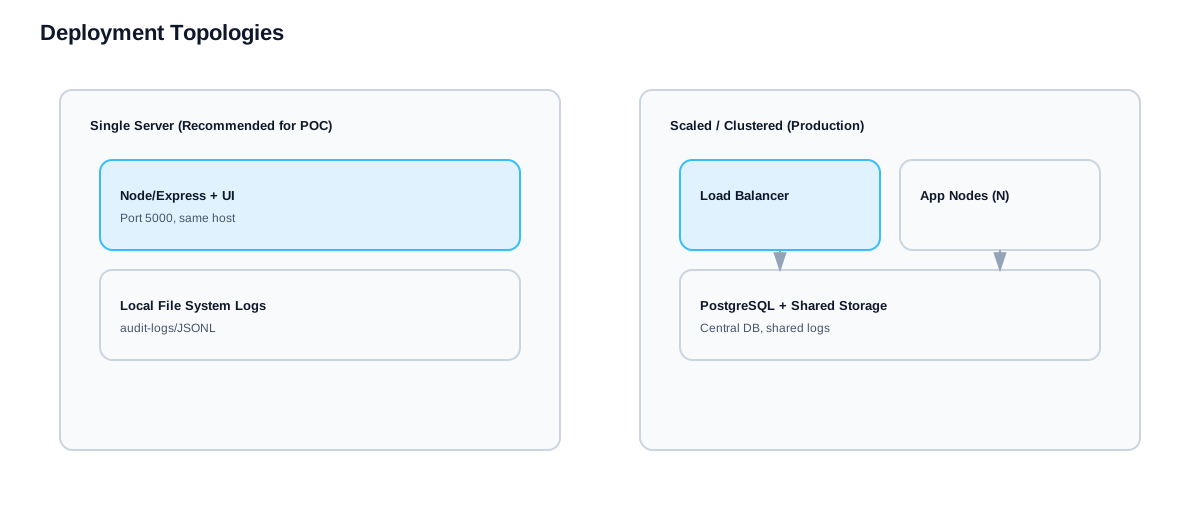
Decision matrix for environment selection
Model
Best For
Core Components
Tradeoffs
Single Node Pilot
Fast proof-of-value and demos
App + DB + storage on one host
Limited resilience
Standard Production
SMB and mid-market operations
2 app nodes, managed DB, reverse proxy
Moderate ops overhead
High Availability
Enterprise SLA-driven environments
Load balancer, multi-node app tier, HA DB
Higher design and run cost
Hybrid Deployment
Regulated segmented networks
On-prem control plane + cloud analytics
Complex network integration
Reference deployment topology.Network segmentation and trust boundaries.
Production Checklist
Readiness gates before go-live
Infrastructure
Reserve CPU and memory for peak ticket and analytics loads.
Allocate persistent storage for logs, attachments, and backups.
Configure DNS, NTP, and TLS certificates.
Validate RPO and RTO with business owners.
Platform
Create admin and support roles with least privilege.
Configure SMTP and escalation policy.
Register agents and verify heartbeat freshness.
Enable audit logging and evidence export policy.
Security
Rotate bootstrap credentials and enforce password policy.
Restrict management endpoints by network zone.
Enable vulnerability scanning for hosts and images.
Encrypt database backup artifacts.
Operations
Define on-call ownership and severity model.
Automate daily backup and weekly restore tests.
Create patch windows and exception process.
Track MTTR, SLA breach rate, and patch compliance.
Do not move to production if backup restore tests and email alert routing remain unverified.
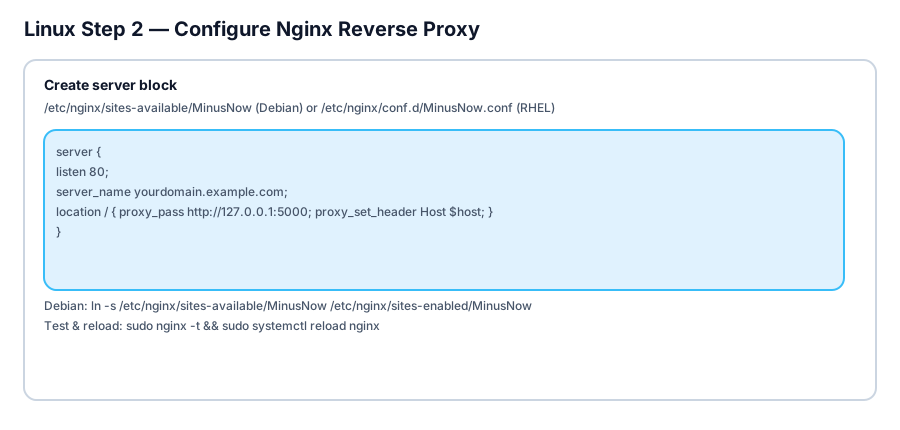
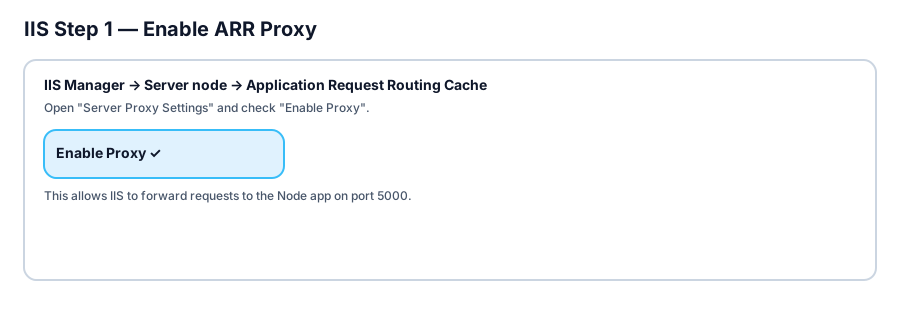
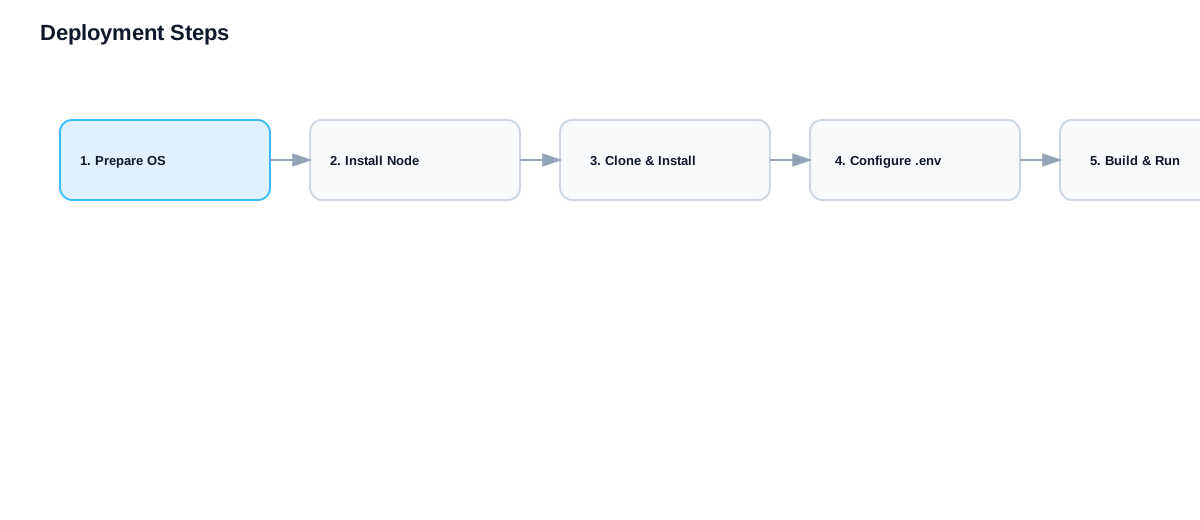
Linux deployment process overview.Windows IIS deployment process overview.
Operational Analytics Model
KPI structure for reliability and service quality
KPI
Formula
Target
Action Trigger
Critical MTTR
Sum resolution time / incident count
Under 60 minutes
Escalate on 2-day average breach
SLA Breach Rate
Breached tickets / total tickets
Under 3 percent
Review assignment and handoff policy
Patch Compliance
Patched assets / eligible assets
Above 95 percent
Open remediation campaign by unit
Alert Noise Ratio
Non-actionable alerts / total alerts
Under 30 percent
Tune thresholds and dedup rules
Agent Freshness
Agents reporting within 15m / total agents
Above 98 percent
Investigate endpoint connectivity
Build weekly review packs from these KPIs and map each deviation to owner, correction plan, and closure date.
Security and Compliance Controls
Baseline control objectives
Identity and Access
Role-based access with separation of duties.
Enterprise identity integration where available.
Monthly privileged access reviews.
Data Protection
Encrypt database and backup artifacts at rest.
Enforce TLS for UI, API, and telemetry channels.
Apply retention policy for records and evidence.
Operational Control
Enable immutable audit logs.
Define change approval chain for production.
Perform quarterly disaster recovery drills.
Vulnerability Governance
Scan hosts and dependencies regularly.
Track exceptions with expiry and owner.
Link patch and vulnerability records in reports.
Integration and Data Blueprint
System boundaries and sync points
Define a master system per entity (ticket, asset, user, vendor, vulnerability) and version each integration contract. This avoids data drift and conflicting ownership.
Northbound
Email, chat, SIEM, and reporting integrations for visibility and routing.
Southbound
Endpoint agents, infra telemetry, and patch execution channels.
Synchronization
Scheduled and event-based sync with dedup and conflict policy.
Error Handling
Retry queues, dead-letter review, and runbook ownership.
Integration map and data exchange boundaries.
Troubleshooting and Recovery
Operational diagnostics playbook
UI not reachable but service is running
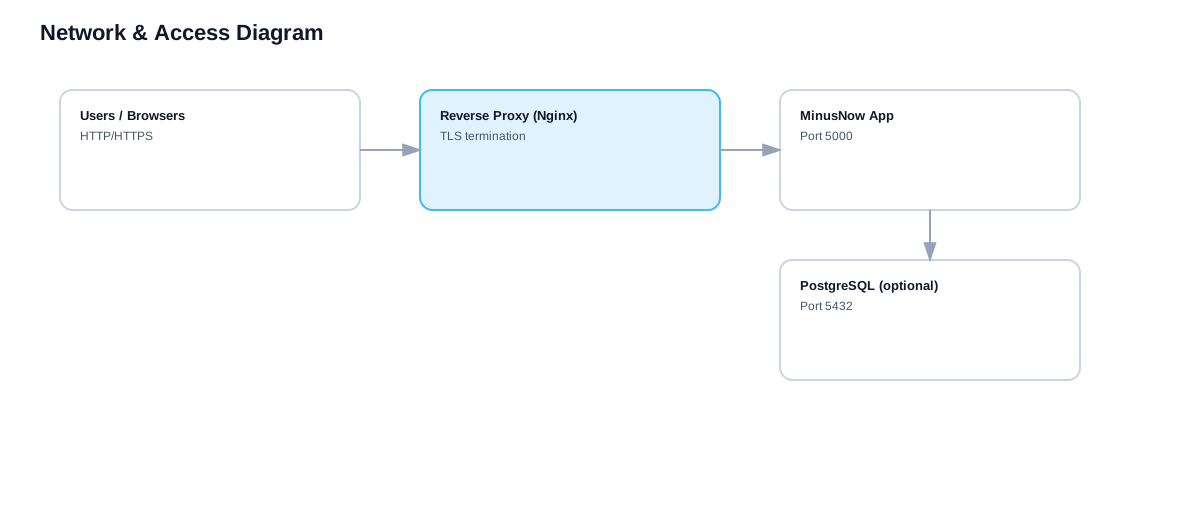
Check reverse proxy routing, certificate bindings, firewall policy, and upstream API health endpoint.
Agents stop reporting telemetry
Validate endpoint service status, outbound connectivity, TLS trust chain, and registration token validity.
Notifications are not sent
Verify SMTP host, port, auth mode, and relay restrictions, then run direct message diagnostics.
Patch campaigns fail at scale
Inspect pre-check output, maintenance windows, reboot policy, and dependency order. Use phased rollout with canary groups.
Database latency rises during peak usage
Review query plans, index coverage, connection pools, and storage latency. Archive stale records if needed.